Effortless Remote Control Troubleshooting: A Comprehensive Guide to Quick Fixes
Dealing with remote controls that fail to function can be incredibly frustrating, especially when these devices stop working at the most inconvenient times, such as during your favorite show or an important sports event. Instead of jumping to the conclusion that your remote is irreparably broken or hastily tossing it aside, it’s essential to understand the common issues that plague remote controls and the straightforward solutions to these problems. This comprehensive guide will help you diagnose and fix remote control problems efficiently, without requiring any advanced technical skills or special tools.
Common Remote Control Issues
Remote controls can exhibit a variety of problems that hinder their functionality, causing unnecessary frustration. Here are some of the most common issues that users encounter, along with easy fixes to restore functionality:
1. Dead Batteries: One of the most frequent culprits behind a non-responsive remote is, unsurprisingly, depleted batteries. If your remote suddenly stops working without any warning, the first step should always be to check the batteries. This is a simple yet often overlooked step.
2. Blocked Signal: The infrared (IR) signal emitted by the remote is what allows it to communicate with the device it controls. If there are objects obstructing this signal, such as furniture or decorations, the remote will be unable to function correctly. Always ensure that the line of sight between the remote and the device is clear.
3. Dirty Contacts: Over time, dirt, dust, and oxidation can accumulate on the battery contacts within the remote, disrupting the necessary electrical connection. This issue can often be resolved with a simple cleaning, bringing your remote back to life.
4. Physical Damage: If the remote has been dropped or subjected to impact, it’s possible that internal components may have become dislodged or damaged. In such cases, further inspection and potential repair may be needed to restore functionality.
Steps to Troubleshoot Your Remote Control
Now that we’ve identified the common issues, let’s explore how to effectively troubleshoot and potentially fix each problem. These steps are easy to follow and can often resolve issues without the need for professional help.
1. Checking and Replacing Batteries: A non-responsive remote typically indicates a power issue. Begin by opening the battery compartment:
- Ensure batteries are correctly inserted according to the polarity markings.
- Replace old batteries with fresh, ideally high-quality ones. This is particularly important as generic or low-quality batteries can fail more quickly.
- Reassemble the remote and test its functionality to see if the problem is resolved.
Pro Tip: Consider cleaning the battery terminals with a cloth dampened with rubbing alcohol. This will remove any oxidation that may impede the connection and ensure a better electrical flow.
2. Testing the IR Signal: If replacing the batteries does not resolve the issue, it’s possible that the infrared transmitter might be at fault:
- Open your smartphone’s camera app and aim the remote’s IR emitter at it. This technique works because most smartphone cameras can detect infrared light.
- Press any button on the remote and look for a flashing light on your phone screen. If you see a flash, the remote is sending a signal.
- If no light appears, the remote’s IR transmitter may be defective. Gently clean the IR emitter and check for any obstructions that may be blocking the signal.
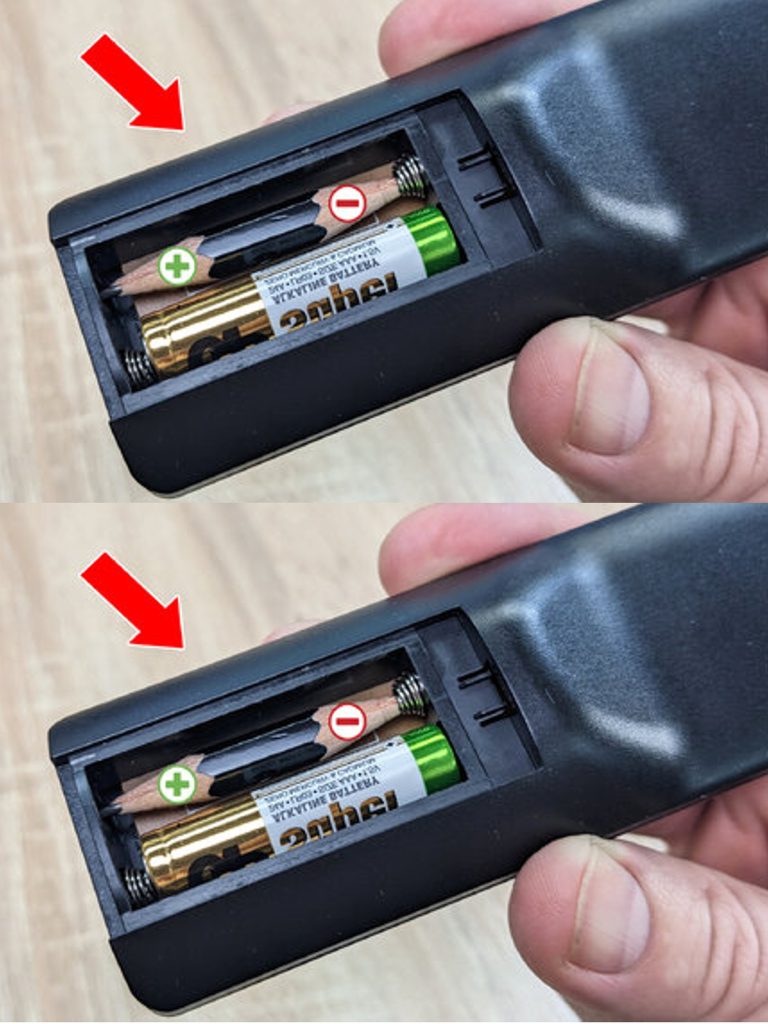
- Gather materials such as a pencil, tweezers, and a spent battery. This may sound odd, but it can work in dire situations.
- Fashion a piece of pencil to match the battery size, flattening the ends to create contacts that can bridge the gap.
- Combine this makeshift battery with a working battery within the remote and test the functionality. It’s a clever hack, but remember, this is only a temporary solution.
4. Reviving Weak Batteries: In some cases, batteries may appear weak but are not entirely dead. Here’s a quick fix you can try:
- Remove the batteries from the remote and rub their ends with aluminum foil. The foil can help improve connectivity.
- Warm the batteries slightly in your hands to stimulate the chemical reactions inside them.
- Reinsert the batteries and check if they work again. This trick can often buy you some extra time.
Note: Like the previous method, this is also a temporary fix and shouldn’t be relied upon for long-term usage.
5. Cleaning the Inside of the Remote: If certain buttons are sluggish or unresponsive, accumulated dirt might be the issue:
- Open the remote carefully using a small tool to avoid damaging the casing.
- Remove any debris or dust, particularly near the buttons and contacts where grime tends to accumulate.
- Soak a cotton swab in a mixture of demineralized water and vinegar, and clean the circuit board. This can help restore the conductivity of the buttons.
- Allow the remote to dry completely before reassembling it to avoid any short circuits when re-powered.
Optional: If you want an easier method, consider using compressed air to blow out dust without dismantling the remote, which can save you time and effort.
6. Inspecting Internal Components: If all previous steps fail, there may be an internal hardware issue that requires more in-depth troubleshooting:
- Open the remote and inspect the circuit board for any loose parts or signs of damage. Pay particular attention to solder joints and connectors.
- If you identify any loose components, gently reinsert them or re-solder broken connections. If you’re not comfortable with soldering, consider seeking assistance from someone who is.
Alternative Option: If troubleshooting proves too complex or challenging, consider using your TV’s control buttons, a mobile app, or a universal remote as a temporary solution. Many smart TVs offer apps that can turn your smartphone into a remote control, providing a convenient alternative.